
Status codes
Log Hero records the status code your server returned for every bot request. This page is the lookup for what those codes mean, and for the part that matters more: what a crawler does next when it gets one.
A status code is not good or bad on its own. A 404 to a bot chasing a link you deleted years ago is correct behaviour. A 404 on your sitemap is an emergency. The code tells you what happened; the URL and the bot tell you whether it matters.
The four classes
Section titled “The four classes”| Class | Meaning | What a crawler generally does |
|---|---|---|
| 2xx | The request succeeded | Takes the content and moves on |
| 3xx | The resource is somewhere else | Follows, up to a limit |
| 4xx | The request cannot be fulfilled | Concludes there is nothing there |
| 5xx | Your server failed | Backs off and comes back later |
The important asymmetry: 4xx is an answer, 5xx is a failure. A crawler treats a 404 as information about your site and adjusts its map accordingly. It treats a 500 as your problem, keeps what it already has, and slows down until you recover.
Log Hero records both. How completely 5xx arrives depends on where your integration sits in your stack — the 5xx section below has the per-integration detail.
2xx — Success
Section titled “2xx — Success”| Code | Name | In a log this means | For a crawler |
|---|---|---|---|
200 |
OK | The page was delivered | Content goes forward for indexing. No guarantee it is indexed. |
204 |
No Content | The server answered, with nothing in the body | Nothing to index. Google cannot process it. |
206 |
Partial Content | A range request was served part of a file | Normal for large media. Not a problem. |
3xx — Redirection
Section titled “3xx — Redirection”Google follows up to 10 redirect hops for a single URL. Beyond that it gives up and the destination is never seen. Intermediate URLs in the chain are not indexed; only the endpoint is.
| Code | Name | In a log this means | For a crawler |
|---|---|---|---|
301 |
Moved Permanently | The URL moved for good | A strong signal to index the target instead of this URL. |
302 |
Found | The URL moved temporarily | Followed, but only a weak signal. The original URL usually stays indexed. |
303 |
See Other | Fetch the result elsewhere, with GET | Handled like a 302. |
304 |
Not Modified | The client already has the current version | Nothing was transferred. Indexing is unaffected; ranking signals may be recalculated. |
307 |
Temporary Redirect | Temporary move, method preserved | Handled like a 302. |
308 |
Permanent Redirect | Permanent move, method preserved | Handled like a 301. |
What to look for in your data: chains and loops. One redirect is fine. Three in a row wastes crawl budget on every request, and a loop burns it entirely while delivering nothing. Sort by path and you will usually find them clustered in one migration’s worth of URLs.
A high share of 304 is healthy. It means conditional requests are working and
crawlers are re-fetching only what changed.
4xx — Client errors
Section titled “4xx — Client errors”With the exception of 429, crawlers read every 4xx as this content does not
exist. New URLs are not indexed, previously indexed URLs are dropped, and the
crawl rate for them decreases gradually rather than stopping at once — which is
why deleted URLs keep appearing in your logs for months.
| Code | Name | In a log this means | For a crawler |
|---|---|---|---|
400 |
Bad Request | The server could not parse the request | Treated as content that does not exist. Often a malformed URL somewhere on your site. |
401 |
Unauthorized | Authentication is required | Not indexed. Expected behind a login, a problem anywhere else. |
403 |
Forbidden | The server refused | Not indexed. See below. |
404 |
Not Found | The resource is not there | Dropped from the index over time. |
405 |
Method Not Allowed | The method is not supported here | Usually a HEAD request your server rejects. |
410 |
Gone | Deleted deliberately, permanently | The same outcome as 404, stated with certainty. |
429 |
Too Many Requests | You rate-limited the client | Not a content signal. Read as overload, see 5xx below. |
451 |
Unavailable For Legal Reasons | Blocked for legal reasons | Not indexed. |
403 deserves a second look
Section titled “403 deserves a second look”A 403 to a named crawler is almost never your application. It is a WAF, a
bot-mitigation rule or your CDN deciding that the request is unwelcome, and
Log Hero is often the first place anyone notices.
Check whether the block is intentional. Refusing AI crawlers may be exactly your policy — but the same rules routinely catch Googlebot and bingbot as collateral, and a site can spend months wondering why its rankings slipped. Compare the 403 rate per bot: if one crawler gets them and the rest do not, the rule is targeted. If everything non-browser gets them, it is not.
404 versus 410
Section titled “404 versus 410”Both remove the URL. 410 says you meant it, and search engines act on it
slightly faster and stop retrying sooner. Use 410 for content you deleted on
purpose and 404 for everything else. The difference is small enough that it
is not worth retrofitting across a site, and large enough to be worth getting
right on a bulk deletion.
5xx — Server errors
Section titled “5xx — Server errors”Log Hero records server errors, and the error rate on the Bot Activity report is defined over 4xx and 5xx together — every status from 400 to 599 as a share of all bot hits.
How completely 5xx arrives depends on where your integration sits in the stack, and it is worth knowing which case you are in before you read a low 5xx count as proof of a healthy server.
| Integration | What it captures |
|---|---|
| Cloudflare Logpush, CloudFront, Fastly, Azure Front Door | Everything. The edge logs the response it actually sent, including the 502 and 504 it generated itself because your origin was unreachable. |
| Apache module | Everything Apache answered, whatever the code. The module logs after the response, so an application crash behind it is still recorded. |
| WordPress plugin, PHP SDK | Errors PHP produced — including fatal errors, because the shutdown hook still runs and reads the final status. Not errors the request never reached PHP for: a dead PHP-FPM pool, a gateway timeout, an exhausted worker pool. |
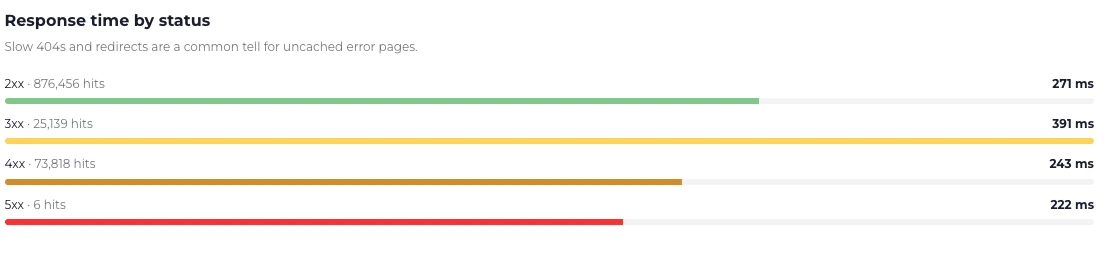
A month of real traffic: 883,912 successful responses, 25,118 redirects, 71,095 client errors — and six server errors. A healthy origin looks like this.
Crawlers respond to 5xx by slowing down. Google reduces its crawl rate in
proportion to how many URLs are affected, keeps the already indexed content for
a while, and removes it only if the errors persist. When 200s come back, the
rate recovers gradually — it does not snap back the moment you fix the server.
| Code | Name | In a log this means | For a crawler |
|---|---|---|---|
500 |
Internal Server Error | The application crashed | Crawl rate drops. Content kept for now. |
501 |
Not Implemented | The method is not supported at all | Rare. Usually a misconfigured server. |
502 |
Bad Gateway | An upstream service returned garbage | Same as 500. Often PHP-FPM or an app container. |
503 |
Service Unavailable | Temporarily unavailable, by design or by overload | The correct code for planned downtime. Send Retry-After. |
504 |
Gateway Timeout | An upstream service did not answer in time | Same as 503, but you were too slow rather than down. |
503 and 429 are the codes you send on purpose
Section titled “503 and 429 are the codes you send on purpose”Neither is a failure. They are answers your stack produces deliberately, from
code that is working, so both arrive on every integration — 429 counted under
4xx, 503 under 5xx. A site that rate-limits crawlers on purpose therefore
carries a permanently raised error rate. Worth remembering before you go hunting
for a regression that turns out to be your own rate limiter doing its job.
Both tell a crawler to come back later, and both are far better than the
alternatives. If a crawler is overwhelming your server, answering 503 or
429 with a Retry-After header is the polite, effective response. It is also
the safe one: unlike a 403, neither code costs you your indexing.
The mistake is leaving them up. Google keeps indexed content through a short
outage, but a site that answers 503 for weeks gets dropped as thoroughly as
one that answers 404.
Reading this in Log Hero
Section titled “Reading this in Log Hero”Log Hero → Bot Activity breaks status codes down per bot, which is where they become useful — the same 404 rate means different things depending on who is getting it. Crawl Budget & Waste goes further for a single bot, separating the 404s from the redirects and the parameter URLs, which is the split that decides what to fix first.
- Errors on
robots.txtor your sitemap. These are not ordinary pages. Google would rather postpone crawling than guess at arobots.txtit cannot read, so one broken file can quietly stop everything. Filter the errors table by path and check these two first. - Response times climbing with crawl volume. Overload shows up as latency before it shows up as 5xx. What Changed plots Googlebot’s crawl volume against its average response time for exactly this. See Find slow pages during crawl peaks.
- A 5xx spike during a crawl peak. On an edge or Apache integration this is a complete signal, not a sample: the crawler found the point where your stack gives out. Read it next to Response time by status.
- Errors on one bot only. Points at a rule that singles it out — a WAF, a rate limit, or user-agent handling in your application.
- A rising 404 rate after a release. Usually internal links, not external ones. Bots find them the same day; visitors take longer to complain.
Further reading
Section titled “Further reading”- HTTP status codes, network and DNS errors, and Google Search — Google’s own account of how it handles each code.
- Crawl budget management — how errors and slow responses change how much Google crawls.
- MDN: HTTP response status codes — the full list, including the codes no crawler will ever send you.