
Detect fake Googlebots
Sites go easy on Googlebot — no rate limit, no CAPTCHA, sometimes no paywall. That makes its name the most-worn disguise on the web. This is how to see who is actually wearing it on your site.
Time: about 10 minutes · You need: a date range inside the period where verification is recorded
1. Open the verification panel
Section titled “1. Open the verification panel”Log Hero → Bot Activity, scroll to Verified vs unverified bots. Each bot gets a verified count, an unverified count and the split as a percentage.
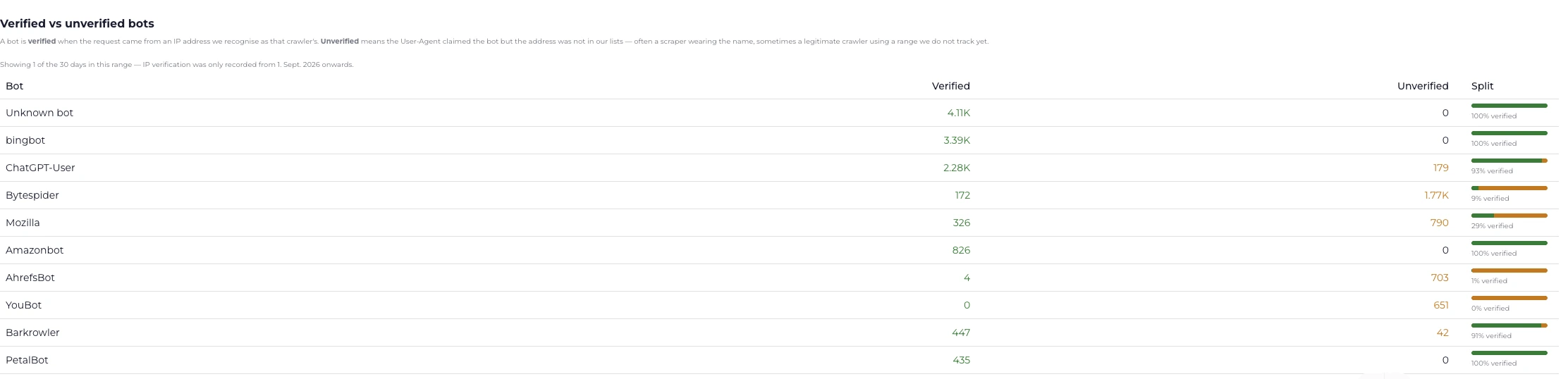
Read the Split column. Bytespider at 9% verified and YouBot at 0% are the rows worth a second look.
If the panel says verification was not recorded for this range, move the date range forward. Verification only exists for the period since it was switched on for your account — there is nothing to recover for earlier dates.
2. Read Googlebot’s split first
Section titled “2. Read Googlebot’s split first”Real Googlebot traffic verifies in the high nineties. Anything materially below that deserves a look.
| What you see | What it probably is |
|---|---|
| 95–100% verified | Normal. Done. |
| A small unverified tail | Usually a range we do not track yet, occasionally a scraper testing the water. |
| Largely unverified | Someone is wearing the name. |
| 0% verified, across every bot | Not a spoofing problem — your client IPs are being replaced. Go to step 4. |
Do the same for bingbot. The two behave alike, and a discrepancy between them is itself informative: a scraper usually picks one name and stays with it.
3. Work out what the unverified traffic is doing
Section titled “3. Work out what the unverified traffic is doing”A spoofed crawler is only worth acting on if it is costing you something. Take the name to the other reports:
- Crawl Budget & Waste, with that bot selected. A scraper walking your entire catalogue looks completely different from one fetching ten pages.
- URL Drilldown on the paths it hits most. Product pages, pricing, an API endpoint — the target tells you the motive.
- Bot Activity → Avg response for that row. If it is high and its volume is high, it is consuming real capacity.
4. Rule out the boring explanation first
Section titled “4. Rule out the boring explanation first”Before you conclude anything: if every bot shows as unverified, nobody is spoofing you. Something between the visitor and the logging point is replacing the client IP with its own, so no address matches any published range.
Behind a reverse proxy or load balancer, the real client address has to be
restored before the request is logged — mod_remoteip on Apache, the
trusted-proxy setting in your framework. See
How bot verification works.
5. Decide what to do
Section titled “5. Decide what to do”Log Hero records; it does not block. The action lives in your infrastructure, and the ladder goes:
- Nothing. A handful of hits a day is noise. Most unverified traffic is.
- Rate-limit it. Answer
429with aRetry-After. Cheap, reversible, and it costs you no indexing if you get the identification wrong. - Block it. A WAF rule matching the User-Agent and a failed reverse-DNS check. Never match the User-Agent alone.
Check it worked
Section titled “Check it worked”If you rate-limited or blocked, come back to the verification panel a week later. The unverified count for that name should fall while the verified count stays flat. If both fall, your rule caught the real crawler too — revert it and narrow the match.
What Changed will also flag it, as a bot whose crawling collapsed.