
Why analytics cannot see bots
Open Google Analytics, look for Googlebot, and you will find nothing. Not a
small number — zero. The same for GPTBot, ClaudeBot, PerplexityBot and
every other crawler that reads your site.
This is not a configuration mistake and there is no setting that fixes it. It follows from how analytics works, and it is worth understanding properly, because the conclusion people usually draw from it — bots are not a significant part of my traffic — is the opposite of the truth.
How an analytics hit is actually created
Section titled “How an analytics hit is actually created”A page view in GA4 is not recorded by your server. It is recorded by the visitor’s browser, and four things have to happen in order:
- The browser requests your page and your server answers.
- The browser parses the HTML and executes the JavaScript in it.
- That script builds a hit — page path, referrer, screen size, client ID.
- The script sends that hit to Google’s collection endpoint as a separate network request.
Your server is only involved in step 1. Steps 2 to 4 happen in the client, and if any of them does not happen, nothing is recorded. As far as analytics is concerned, the visit did not occur.
Why crawlers fall out of that chain
Section titled “Why crawlers fall out of that chain”Most of them stop at step 1
Section titled “Most of them stop at step 1”A crawler’s job is to fetch your HTML and read it. Fetching is cheap; running a browser engine is expensive. So the overwhelming majority of crawlers — the AI training bots, the AI assistants fetching a page to answer a question, the SEO tools, the scrapers, the uptime monitors — request the document, take the markup, and move on. They never parse the JavaScript, so your tag never runs and never sends anything.
There is nothing to filter, block or configure here. The hit was never made.
The ones that do render are excluded anyway
Section titled “The ones that do render are excluded anyway”Googlebot is the exception that proves the rule: it does render pages, JavaScript included, using a headless browser. In principle your tag could fire.
It still does not show up, because GA4 automatically excludes traffic from known bots and spiders, matched against an industry list of crawler identifiers. This filtering is on by default and, unlike Universal Analytics, cannot be switched off. Anything Google’s renderer might have generated is discarded before it reaches your reports.
So the answer is two-layered, and both layers point the same way: crawlers that do not render are invisible because the tag never fires, and crawlers that do render are invisible because they are filtered out.
And a rendered fetch would not have told you the truth anyway
Section titled “And a rendered fetch would not have told you the truth anyway”Even if you could capture it, a render from Google’s infrastructure is not the same event as the crawl. It happens later, from different addresses, sometimes not at all. You would be measuring the rendering queue, not the crawl.
What your server sees instead
Section titled “What your server sees instead”Your server has no such gap. It answers every request personally, before any page renders and regardless of whether the client can run JavaScript at all. For each one it writes a line recording who asked, what they asked for, what it answered, and how long it took.
That record is complete by construction. A crawler cannot opt out of it, cannot block it, and does not need to cooperate with it.
| Analytics tag | Server log | |
|---|---|---|
| Written by | The visitor’s browser | Your server |
| Requires JavaScript | Yes | No |
| Requires consent | Usually | No — it is your own operational record |
| Sees crawlers | No | Yes, all of them |
| Sees cached responses | Yes, if the browser ran the tag | Only if the request reached the logging point |
| Knows about engagement | Yes — scroll, clicks, conversions | No. It sees requests, not behaviour |
Neither is a replacement for the other. Analytics is the better tool for understanding people; it knows what they did after the page loaded. A log is the only tool that knows machines exist.
Anatomy of a log line goes through what exactly one of those lines contains.
Why the blind spot is expensive now
Section titled “Why the blind spot is expensive now”For most of the web’s history this mattered mainly to technical SEOs worrying about crawl budget. That has changed.
A large share of the machines fetching your pages today are AI crawlers, and some of them represent a person: when someone asks an assistant a question about your product, the assistant may open your page live to answer it. That is real demand, generated by a real human, arriving on your server — and it is categorically absent from every JavaScript-based analytics tool.
If your reporting is analytics-only, you cannot currently answer:
- Which AI systems have read your content, and how much of it.
- Whether anyone is being sent to your pages by an assistant.
- Which of your URLs crawlers keep hitting errors on.
- Whether the pages in your sitemap are being crawled at all.
- How much of your server capacity goes to machines rather than people.
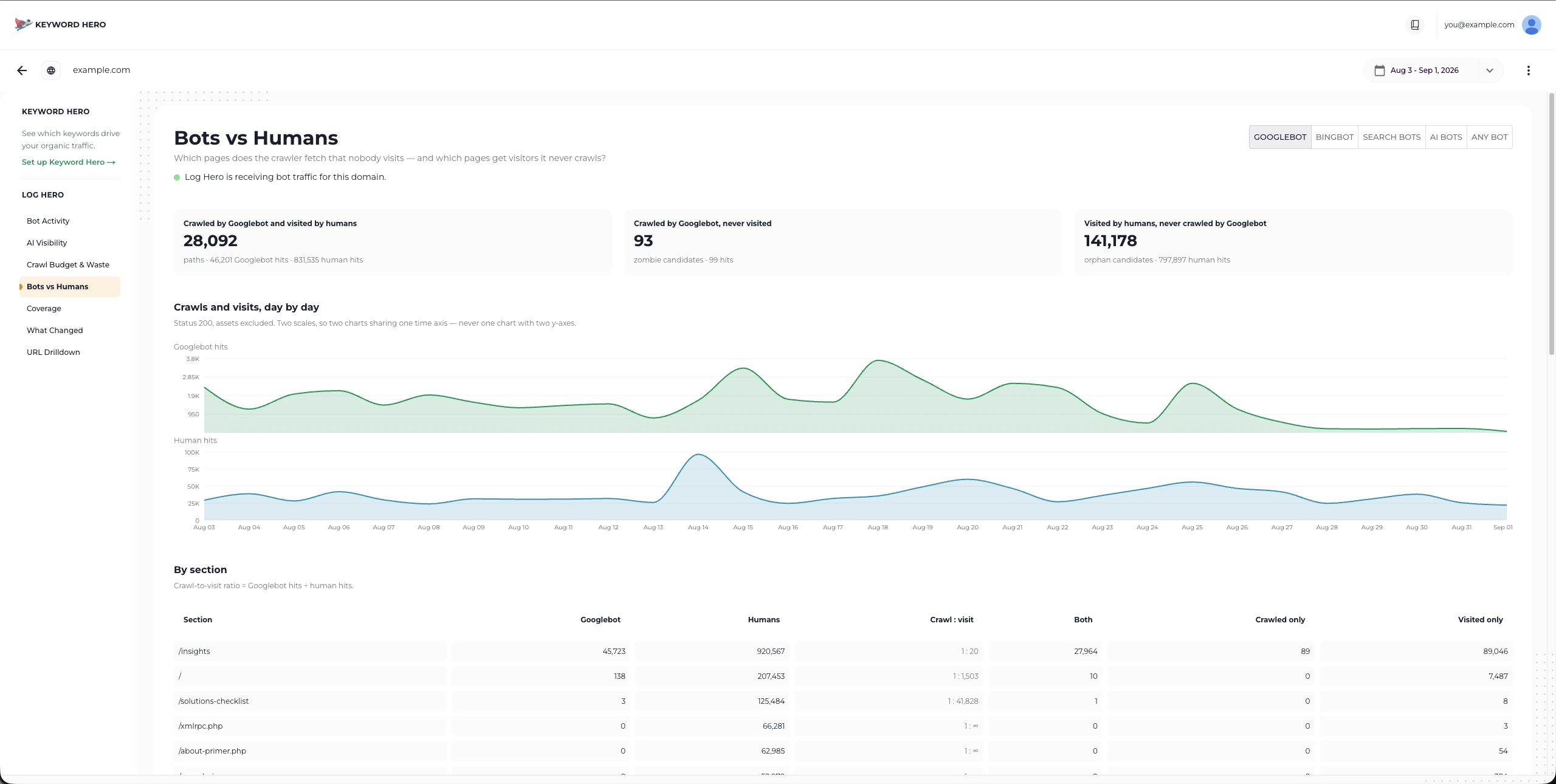
Bots vs Humans puts the two populations side by side — including the pages bots crawl that no person ever visits, and the pages people visit that no crawler has been to.
The number that surprises people
Section titled “The number that surprises people”Once you start recording requests rather than rendered page views, the split is usually not what teams expect. On many sites, particularly content-heavy ones, bots account for a substantial share of all requests — sometimes more than humans do.
None of that traffic has ever appeared in your analytics. It has been there the whole time, in a file on your server, waiting to be read.
What to do about it
Section titled “What to do about it”You do not have to choose. Keep analytics for people and add the log for machines — that is exactly the split Log Hero implements. An integration hands over the requests your server already records, Log Hero classifies and verifies them, and the result lands in its own reports and, optionally, in a separate GA4 property so bot data never touches your real numbers.
- The beginner’s guide to log file analysis — what a log contains and how to read it yourself.
- Choose your integration — which log to collect for your setup.
- The GA4 property — why the bot data gets its own property rather than joining your existing one.