
See which AI bots crawl your site
Your analytics shows nothing from AI crawlers, because none of them run JavaScript. Your logs have all of it. This is how to read it.
Time: about 10 minutes · You need: a working integration and a few days of data
1. Open AI Visibility
Section titled “1. Open AI Visibility”Log Hero → AI Visibility, with a date range of at least 7 days. A shorter window on a small site can miss a crawler entirely — some AI bots visit weekly rather than daily.
The AI bots health table is the answer to “which ones are here”: every AI bot that reached your site in the window, with its hits, its error counts and its average response time.
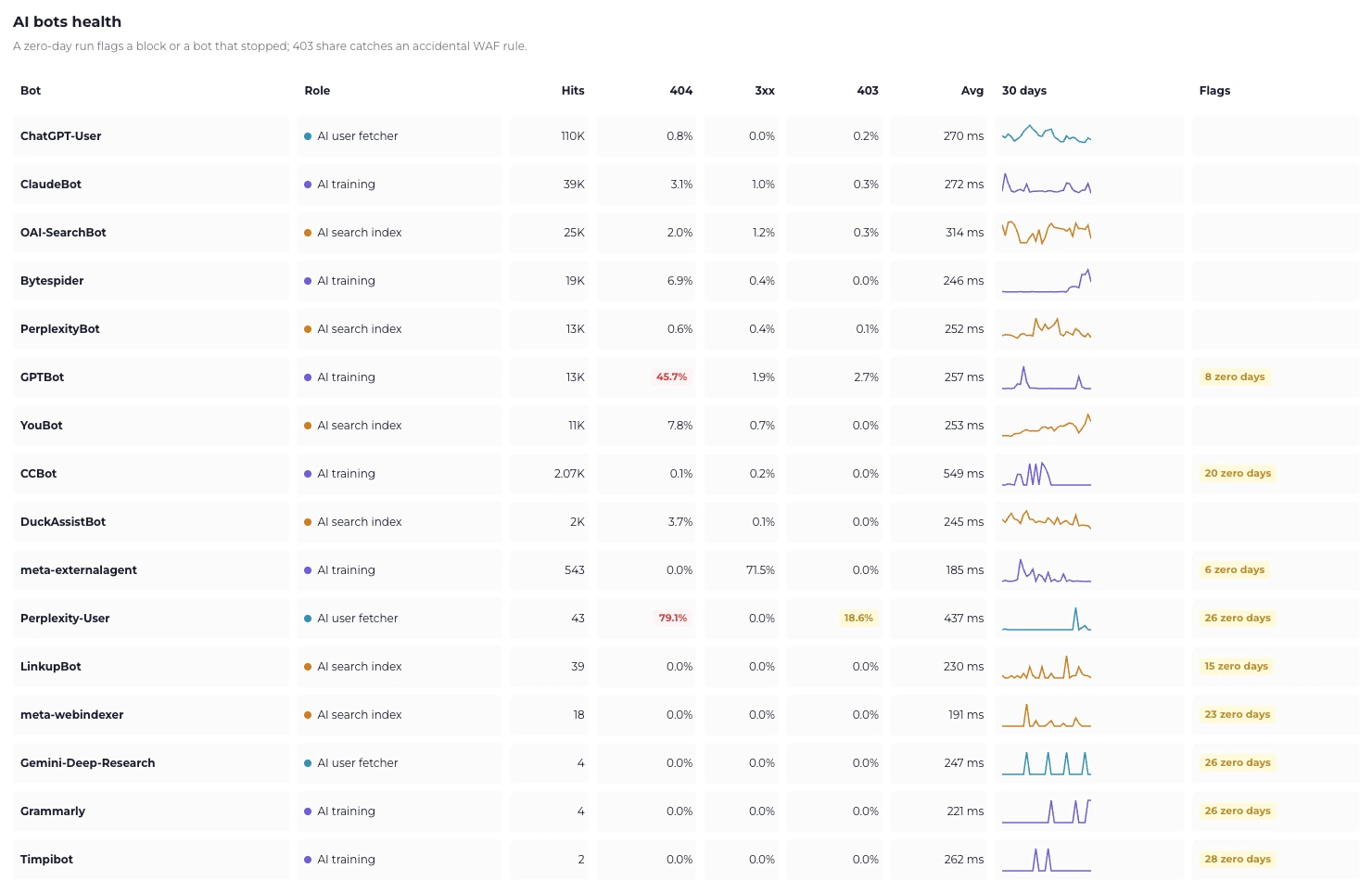
Read the Flags column: “8 zero days” means the bot went quiet on eight days in the window, which is either a block or a crawler that stopped.
2. Read the role, not just the name
Section titled “2. Read the role, not just the name”The report splits AI bots by what they are doing, and the distinction changes what the number means:
| Role | What it is doing | What a high number means |
|---|---|---|
| AI training | Collecting content to train a model | Your content is being ingested. Whether you want that is a policy question. |
| AI search index | Building an index to answer questions from | You are a candidate to be surfaced in AI answers. |
| AI user fetcher | Opening a page right now because someone asked | A person is in the loop. Someone asked an assistant something and it came to you. |
The user-fetcher row is the one to watch. It is the closest thing in your logs to an AI-driven visit, and it is the number to trend over time.
Search, training and retrieval
crawlers goes into what each
role means for your site — including why disallowing GPTBot stops training but
not citation.
3. Find out what they actually read
Section titled “3. Find out what they actually read”Pages AI fetches for users lists the paths behind that number. This is usually where the surprise is: the pages AI assistants pull are rarely the pages you optimised for search.
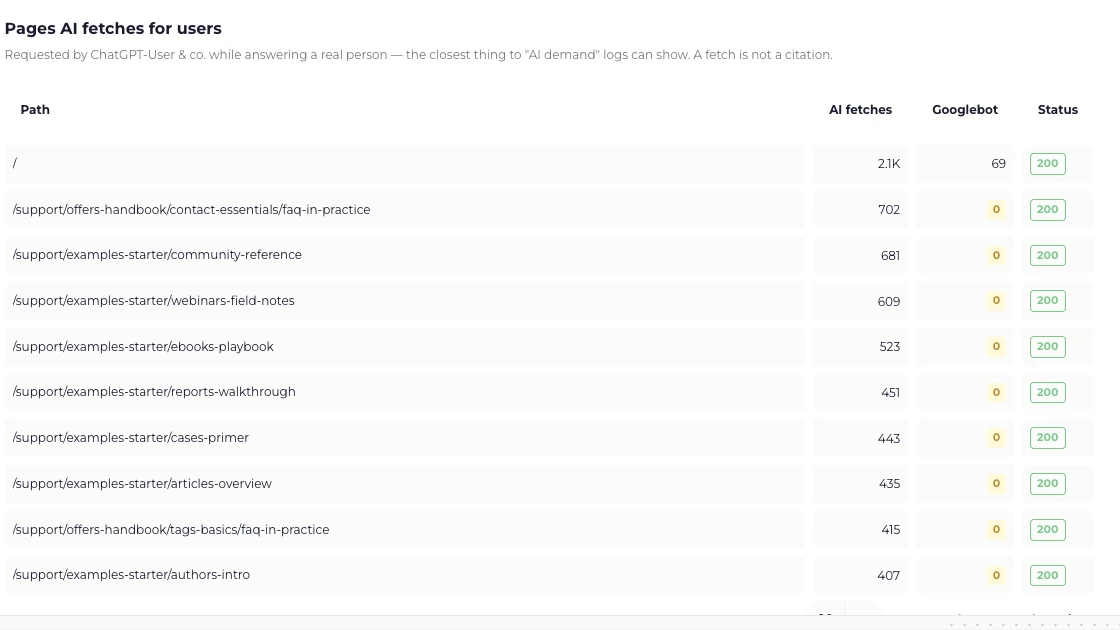
The Googlebot column next to it is the interesting part: several of these pages get hundreds of AI fetches and zero Googlebot hits.
Sections AI reads vs Google reads takes it up a level, comparing the share of crawling each section gets from AI bots against Googlebot. A section with a high AI share and low Google share is content that answers questions well and ranks badly — often worth a second look.
4. Check they are not hitting walls
Section titled “4. Check they are not hitting walls”Two columns in AI bots health matter more than the hit count:
- 404. An AI crawler chasing dead URLs is spending its budget on nothing.
- 403. Almost never your application. It is a WAF or CDN rule, and it may be deliberate — but a rule aimed at scrapers routinely catches search bots too. See Status codes.
Compare against Googlebot’s rates on Bot Activity. If only the AI bots get 403s, something is targeting them specifically.
What this cannot tell you
Section titled “What this cannot tell you”- Whether an assistant cited you. The log records the fetch. What the model did with it afterwards is not in your data, and no log-based tool has it.
- Whether the page was readable. Most AI fetchers do not run JavaScript. A
fetch of a client-rendered page is a
200that returned an empty shell. - Whether the bot was who it claimed. User-Agents are trivially forged. Check the verification split on Bot Activity, and see How bot verification works.
If a bot you expect is missing
Section titled “If a bot you expect is missing”- Widen the window to 30 days before concluding anything.
- Check
robots.txt. ADisallowfor that agent means the traffic is genuinely not there. - Check your WAF. Blocked before logging means invisible.
- Check your integration’s coverage. An origin integration behind a CDN misses everything served from cache. See Choose your integration.