
Find slow pages during crawl peaks
Google crawls less when a site answers slowly. That makes response time under crawl load a thing worth checking occasionally, rather than a metric to watch daily.
Time: about 15 minutes · You need: at least 14 days of data
1. Ask whether the two are related at all
Section titled “1. Ask whether the two are related at all”Log Hero → What Changed, panel Does Googlebot slow down when the server does? — Googlebot’s crawl volume plotted against its average response time for the same days.
- Flat response time under rising volume. Your server absorbs the crawl. Nothing to do here.
- Response time rising with volume. The crawl is costing you capacity, and Google is likely to respond by crawling less.
- Response time rising, volume falling. The most common shape, and the one worth acting on: Google has already backed off.
Two weeks is a short baseline. A single heavy crawl day will bend this chart, so look at the shape rather than any one point.
2. Find what is slow
Section titled “2. Find what is slow”Response time by section narrows it to a part of the site. Response time by status is often the faster answer, and the finding is usually the same one: error pages and redirects are slower than real pages.
That sounds backwards until you remember caching. A 200 on a popular page is
served from cache in milliseconds. A 404 typically misses every cache, boots
the application and renders a template — so a site with a large 404 tail spends
a surprising share of its server time answering requests for things that do not
exist.
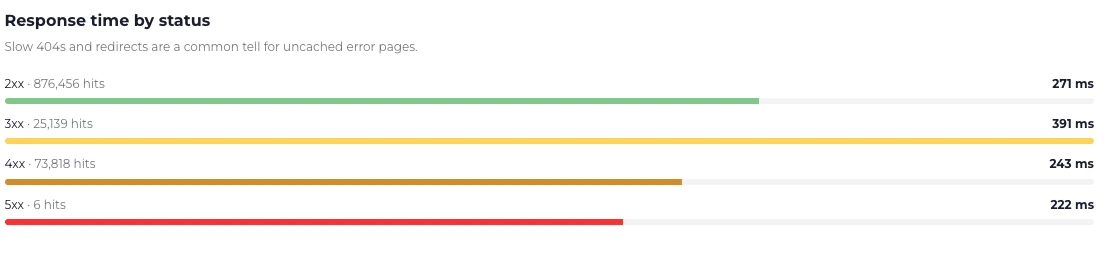
Redirects are the slow class here at 392 ms, well above the 272 ms that 2xx responses take.
If that is your shape, the fix lives in Find crawl errors, not in performance work.
3. Compare bots against each other
Section titled “3. Compare bots against each other”Bot Activity → bots table, column Avg resp. A large gap between two bots on the same site is informative:
- One bot much slower. It is requesting a different mix of pages — usually deeper, less popular URLs that miss the cache.
- Every bot slow, humans fine. Bots reach pages your cache never warms. Normal to a degree; extreme cases mean your cache strategy assumes traffic patterns bots do not have.
4. Confirm the reading
Section titled “4. Confirm the reading”Two checks before you conclude anything:
- What the number measures. Response time is what the recording layer saw. A WordPress or PHP integration measures how long the application took, not what the client experienced — no network, no rendering. See Metrics.
- Where it was measured. With an origin integration behind a CDN, the fast cached responses are invisible and only the slow uncached ones are recorded, which makes your site look slower than it is.
5. If the crawl really is the load
Section titled “5. If the crawl really is the load”- Cache what bots request, not just what people request.
- Answer
503with aRetry-Afterif you have to shed load. It is the code crawlers are built to respect, and unlike a403it costs you no indexing. - Do not block the crawler. A block solves the load and creates a larger problem. See Status codes.