
Find crawl errors
A crawl error only costs you something when a bot keeps coming back for it. This is how to separate the errors worth fixing from the ones that are working as intended.
Time: about 20 minutes · You need: at least 7 days of data
1. Start with the rate, not the list
Section titled “1. Start with the rate, not the list”Log Hero → Bot Activity, tile Error rate: the share of bot requests answered with a 4xx or 5xx. Its delta tells you whether this is a standing condition or something that started recently.
A stable error rate on an old site is usually the long tail of links to pages you deleted years ago — real, harmless, and not worth an afternoon. A rate that jumped last week is a regression, and the next step is What Changed, which will name the section.
2. Rank by hits, not by count
Section titled “2. Rank by hits, not by count”Top errors lists status code, path, the bot hitting it most, and the hit count. Sort by hits and work from the top.
One URL 404ing 400 times a week is a bigger problem than 400 URLs 404ing once, because repeat requests mean something is still pointing there. A single hit on a nonsense path is a bot guessing.
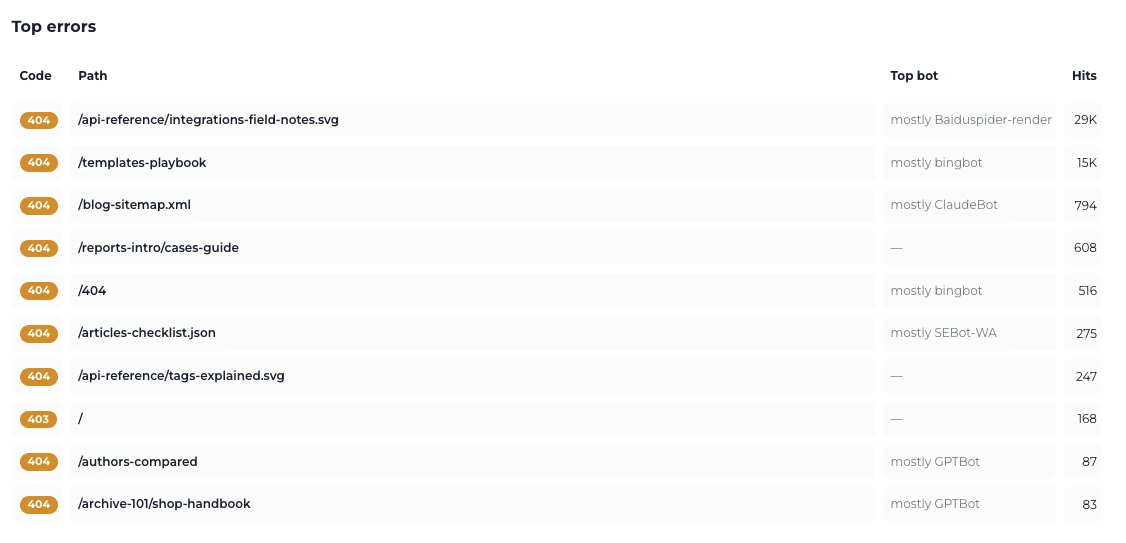
The top row is 29,000 hits on one missing file. The rows below it are three orders of magnitude smaller — start at the top.
Check two paths by name before anything else, whatever their position in the
list: /robots.txt and your sitemap. Google would rather postpone
crawling than guess at a robots.txt it cannot read, so one broken file there
can quietly throttle everything.
3. Find where the links are
Section titled “3. Find where the links are”Crawl Budget & Waste, with the bot set to the one from step 2, breaks the errors down by what is causing them:
- Not-found paths consuming budget. Repeatedly requested 404s. Each one has a source — an internal link, an old sitemap entry, a backlink.
- Redirected paths still being crawled. These cost more than 404s. A bot that follows a redirect spends two requests, every time, for as long as something keeps linking to the old URL.
- Parameter keys. Tracking and filter parameters multiplying one page into thousands of near-duplicate URLs. Usually the largest single sink.
The report’s own framing is worth keeping: a clean 404 is cheap for Google. The expensive part is whatever still links to it.
4. Fix by cause, not by URL
Section titled “4. Fix by cause, not by URL”| What you found | The fix |
|---|---|
| 404s on URLs you deleted deliberately | Return 410 and stop worrying about them |
| 404s on URLs that should exist | Fix the page, or redirect it once |
| 404s from internal links | Fix the links. Redirecting hides the problem |
| Long redirect chains | Point the first URL straight at the final one |
| Parameter URLs | Canonical tags, and parameter handling at the CDN |
| 403s on a named crawler | A WAF rule. Confirm it is deliberate |
5. Confirm the fix worked
Section titled “5. Confirm the fix worked”Open URL Drilldown for one of the URLs you changed — every path row in the
other reports links into it. The status served, by day chart shows the flip
from 404 to 200, or from 301 to nothing, on the day it happened.
Give it a week. Bots re-crawl on their own schedule, and a URL disappearing from the errors table is the confirmation, not an instant status change.
What you will not find here
Section titled “What you will not find here”- Soft 404s. A page returning
200with “not found” content is a200in every log. See Status codes. - Redirect targets. The log records that a
301was served, not where to. - Errors your CDN answered. With an origin integration, anything the edge handled never reached you.